Windows games, at home on Linux.

Run, play and configure your Windows games and their mods the way you would on Windows. Each game gets its own Proton room, and any mod manager or trainer can join it. Coming soon as v0.1.0 Beta.

Watch on GitHub Free and open source · MIT
Skyrim Special Edition
Windows game · Proton · GE-Proton11-11
Running
In this roomOne shared container
  • Skyrim via SKSE64
    Script extender · skse64_loader.exe
    Running
  • Trainer
    Sees SkyrimSE.exe as process 400
    Running
  • Mod manager
    Mod Organizer 2, Vortex or another
    Open
DisplayFullscreen · 1920×1080

Why it exists

Proton made Windows games run on Linux. The hard part is everything you do around them on Windows: mod managers like Mod Organizer 2 or Vortex, script extenders and trainers all need the game’s exact environment, and every launcher treats them as strangers.

Today, on Linux

  • Every game needs its own Wine prefix, made and kept by hand.
  • A trainer started from its own launcher can’t see the game’s process.
  • Mod managers run in a different environment and lose track of the game.
  • Crash logs get overwritten the moment the next app starts.

With Respawn+

  • Each game gets its own prefix and runner automatically.
  • Trainers join the game’s container and find it: process 400, found.
  • Any mod manager or script extender shares the game’s runner and prefix.
  • Every app writes its own launch log, so a crash leaves evidence.

How a game respawns

SkyrimSE.exe
Skyrim Special Edition
Found in ~/Downloads
Choose a runtime

First it’s found.

Find games scans your folders for Windows games. Nothing is copied or changed.

SkyrimSE.exe
Skyrim Special Edition
GE-Proton11-11 · prefix game-2
Ready to play

Then it gets a room.

Its own Wine prefix and runner, kept apart from every other game.

Companion apps
  • Your mod managerMO2, Vortex…
  • Script extenderSKSE…
  • TrainerWeMod…

Then its mods move in.

Add any mod manager, script extender or trainer. Each one shares the game’s runner and prefix.

Skyrim Special EditionRunning
  • SKSE64Running
  • TrainerRunning
SkyrimSE.exe · process 400

Then they play together.

One shared container, so every companion app finds the game, just as on Windows.

What it does

Pick or borderless for each game before it starts. Every session is timed and your mod manager works inside the game’s own environment, as it does on Windows.

Display modes work for Skyrim Special Edition and Fallout 4 today; playtime and sessions cover every game.

Read the docs

Everything in the Beta

Real screens from the Beta

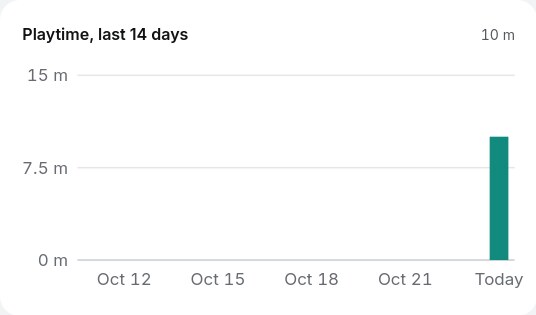
Playtime is counted per day from every session, including the ones a script extender starts. Light and dark themes follow your desktop.
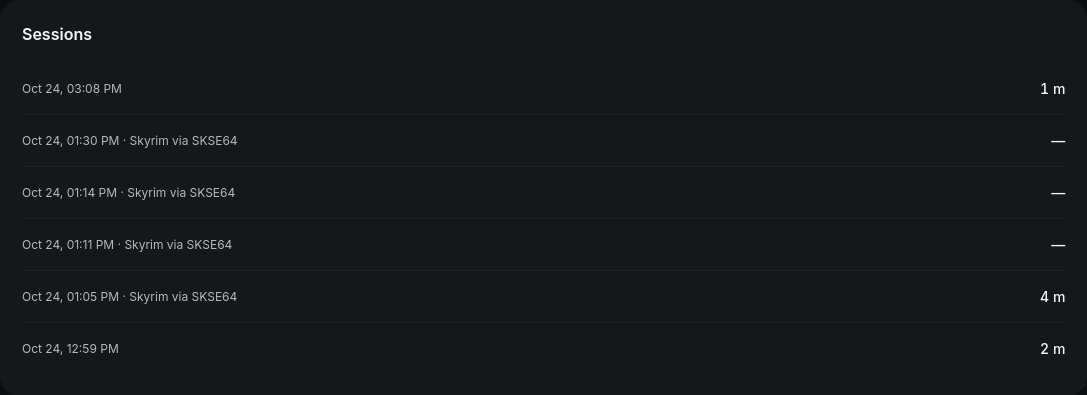
A game's session list in the Respawn+ launcher, dark theme: six sessions with their dates and lengths
Every session of one game, with the companion app that started it.
The playtime chart for the last 14 days, light theme, with today's bar in teal
The last 14 days, today in teal.
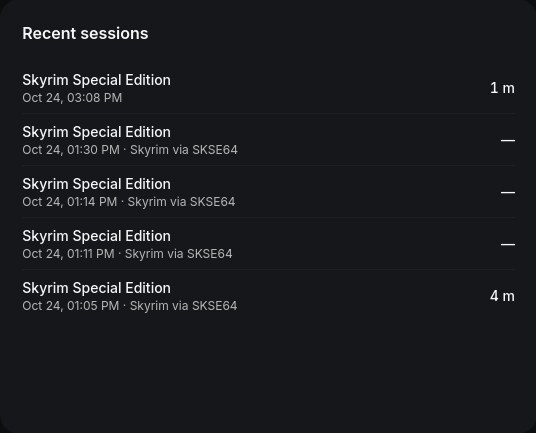
The recent sessions list on the launcher's home screen, dark theme
Recent sessions on the home screen; a dash marks a session whose length was not recorded.
Skyrim Special Edition
Running
Game · SkyrimSE.exe
  • RunnerGE-Proton11-11
  • Prefixprefixes/game-2
  • RoomShared with the game
SKSE64
Running
Script extender · skse64_loader.exe
  • RunnerGE-Proton11-11
  • Prefixprefixes/game-2
  • RoomShared with the game
Mod Organizer 2
Ready
Mod manager · ModOrganizer.exe
  • RunnerGE-Proton11-11
  • Prefixprefixes/game-2
  • RoomShared with the game
A trainer
Running
Trainer · Any trainer .exe
  • RunnerGE-Proton11-11
  • Prefixprefixes/game-2
  • RoomShared with the game

Tested so far

Version 1.7.104 reached the menu and a new game under GE-Proton 11, in fullscreen set from Respawn+.

Get notified

I play on ,
tell me when it respawns.

Opens the project’s releases on GitHub; choose Watch, then Releases, to hear when v0.1.0 lands. Fedora is where Respawn+ is tested first, as an RPM package.